Address
304 North Cardinal St.
Dorchester Center, MA 02124
Work Hours
Monday to Friday: 7AM - 7PM
Weekend: 10AM - 5PM


 ByRajindera Comp
People In Websites or Web Pages, Login System isn’t basic and not especially troublesome. So Today I Will Create The Full Login System . I will Create First Registration System then Login System in PHP using MySQL Database With XAMPP AND phpMyAdmin using Session system & password_hash function method technique.
With My Opinion Creating of Login System, First We Need a Specially Database in light of the fact that without database you probably won’t be completely use login system or page in sites or website pages, as in login system you do give subtleties, for example, username ,secret key or and so on , server or system can’t confirm the subtleties without database and its gets blunder if utilize brief area since system initially check subtleties whose you gave from database, so its essential. After That Good and Simple Code is needed.You Can Also Try Advanced Code But not utilize Complex Code. In PHP Programming, Many Codes are accessible of Login System whose that keeps running on various distinctive conditions and Platforms,Ways.So I Will Create Login System in Easiest Way includes Registration System & Session System & Logout Function .
In Previous Login Tutorial Post i created the login system without encryption and stores data (username and password) in plain text in Database. But in this login tutorial post i use password_hash & password_verify encryption function method technique to store password into database .
In this area we’ll construct a registration system that enables clients to make another record by rounding out a web structure. In any case, first we have to make a table in database that will hold all the client information.
CREATE TABLE `user` (`id` INT NOT NULL PRIMARY KEY AUTO_INCREMENT,
`username` VARCHAR(111) NOT NULL UNIQUE ,`password` VARCHAR(255) NOT NULL ,
created_at DATETIME DEFAULT CURRENT_TIMESTAMP) ENGINE = InnoDB;
<?php
// Registration Page
include('config.php');
if(isset($_SESSION['username'])){
	header("location: welcome.php"); // Redirecting To Welcome Page
	exit();
}
if ($_SERVER['REQUEST_METHOD'] == "POST"){

	if (!empty(trim($_POST['username'])))
	{
	 // Prepare a select statement
$sql = "SELECT id FROM user WHERE username = ?";

	        if($stmt = mysqli_prepare($conn, $sql)){
				 // Set parameters
            $check_username = trim($_POST['username']);
            // Bind variables to the prepared statement as parameters
            mysqli_stmt_bind_param($stmt, "s", $check_username);

           // Attempt to execute the prepared statement
            if(mysqli_stmt_execute($stmt)){
                /* store result */
                mysqli_stmt_store_result($stmt);

                if(mysqli_stmt_num_rows($stmt) == 1){
					$userpass_err = "This username is already taken.";
					}

				elseif(strlen(trim($_POST['password'])) < 6 )
				{
				$password_err = "Username OK ! Password has must alteast 6 Characters";
				}
				else
				{
			 $username = trim($_POST["username"]);
			 $password = trim($_POST["password"]);
     $sql = "INSERT INTO user (username, password) VALUES (?, ?)";
            $stmt = mysqli_prepare($conn, $sql);
     // Set these parameters
        $param_username = $username;
        $param_password = password_hash($password, PASSWORD_DEFAULT);
 mysqli_stmt_bind_param($stmt, "ss", $param_username, $param_password);
// Try to execute the query
        if (mysqli_stmt_execute($stmt))
        {
		  $suc = "Registered Sucessfully"; //Sucessful Message Pass Or Show
          header('refresh:5; url=login.php'); // Redirecting To Login Page
    }
		else
		{
			echo "something Wrong";
		}

     mysqli_stmt_close($stmt);
	}
		}
			}
	}
	}

mysqli_close($conn);

?<

<html>
<head>
<link rel="stylesheet" type="text/css" href="style.css">
</head>
<body>
<div class="wrapper">
      <h2 class="form-signin">Welcome</h2>
     <form  method="post" action="" enctype="multipart/form-data"/>
     <input type="text"  name="username" placeholder="Username" required autofocus />
      <input type="password"  name="password" placeholder="Password" required/>
		 <br><span><?php echo $userpass_err;?>
	  <?php echo $password_err; ?>  <?php echo $suc; ?></span></br>
  <center><input type="submit" value="Create Account" name="login_user"/></center></form>
  <div class="h2">Already Registered</div><a href="login.php"><input type="submit" value="Click Here"  name="Click Here" /></a>
   </div>
  </body>
  </html>
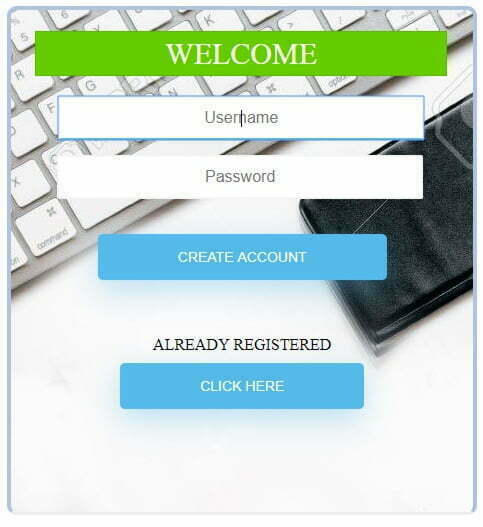
<?php
session_start();
$suc = '';
$user_err = '';
$userpass_err = '';
$password_err = '';
$username = $password = "";
$check_username = $param_username = $param_password = '';
// Connection To Database My SQl & Main Root User
$conn = mysqli_connect("localhost","root","") or die ("could not connect");
    // Selecting Database into MySQL Server (phpMyadmin)
     mysqli_select_db($conn,"login") or die ("could not find database");

if($conn === false){
    die("ERROR: Could not connect. " . mysqli_connect_error());
}
?>
    @charset "utf-8";
/* CSS Document */

h2 {
  text-align: center;
  font-size:30px;
  display:block;
  text-transform: uppercase;
  margin: 0 auto;
  font-family: inherit;
  font-weight: 500;
  line-height: 1.1;
  color: inherit;
}
h1
{
	color: whitesmoke;
	font-weight: 500;
}
.h2 {
  text-align: center;
  font-size:16px;
  display:inline-block;
  text-transform: uppercase;
  font-family: inherit;
  top:1px;
  font-weight: 500;
  line-height: 1.1;
  color:black;
}
.box
{
background:white;
	border:2px solid hsla(0,11%,89%,1.00);
	border-radius:100px;
}

.col1{
	color:peru;
	font-weight: 500;
}

.wrapper{
	width:420px;
	height:460px;
	position:relative;
	margin: 10px 0px 0px 30%;
	background-color:#fff;
	text-align: center;
	border: 4px solid #B0C4DE;
	border-bottom: none;
	border-radius: 10px 10px 0px 10px;
    padding: 21px;
  }

.img
{
 background: url(images/back.jpg);
}
.col3
{
	background: url(images/04.jpg) center;
}

.form-signin{
display:block;
   width:400px;
  border: 1px solid rgba(0,0,0,0.1);
  padding: 5px;
  margin-left:3px;
  background:#6C0;
  color:#FFF;

}

.col
{
	background-color:sandybrown;
	color: white;
	font-weight: 500;
}

	.checkbox {

	  margin-bottom: 28px;
	  	  font-weight: normal;
	}


	input[type="text"] {

  color: #0d0d0d;
  text-align: center;
  display: inline-block;
  font-size: 16px;
  width: 87%;
  height: 44px;
  margin: 20px 12px 10px 10px;
  border: 2px solid #f6f6f6;
  -webkit-transition: all 0.5s ease-in-out;
  -moz-transition: all 0.5s ease-in-out;
  -ms-transition: all 0.5s ease-in-out;
  -o-transition: all 0.5s ease-in-out;
  transition: all 0.5s ease-in-out;
  -webkit-border-radius: 5px 5px 5px 5px;
  border-radius: 2px 2px 2px 2px;
	}

 input[type="password"] {

	color: #0d0d0d;
  text-align: center;
  display: inline-block;
  font-size: 16px;
  width: 87%;
  height:44px;
  border: 2px solid #f6f6f6;
  margin: 5px 5px 5px 5px;
  -webkit-transition: all 0.5s ease-in-out;
  -moz-transition: all 0.5s ease-in-out;
  -ms-transition: all 0.5s ease-in-out;
  -o-transition: all 0.5s ease-in-out;
  transition: all 0.5s ease-in-out;
  -webkit-border-radius: 5px 5px 5px 5px;
  border-radius: 2px 2px 2px 2px;

	}

	input[type=text]:focus, input[type=password]:focus {
  background-color:#fff;
  border-bottom: 2px solid #5fbae9;
}

input[type=text],input[type=password]:placeholder {
  color: #cccccc;
}

input[type=button], input[type=submit], input[type=reset]  {
  background-color: #56baed;
  border: none;
  color: white;
  display:inline-block;
  padding: 15px 80px;
  text-align: center;
  text-decoration: none;

  text-transform: uppercase;
  font-size: 14px;
  -webkit-box-shadow: 0 10px 30px 0 rgba(95,186,233,0.4);
  box-shadow: 0 10px 30px 0 rgba(95,186,233,0.4);
  -webkit-border-radius: 5px 5px 5px 5px;
  border-radius: 5px 5px 5px 5px;
  margin: 10px 20px 40px 20px;
  -webkit-transition: all 0.3s ease-in-out;
  -moz-transition: all 0.3s ease-in-out;
  -ms-transition: all 0.3s ease-in-out;
  -o-transition: all 0.3s ease-in-out;
  transition: all 0.3s ease-in-out;
}

input[type=button]:hover, input[type=submit]:hover, input[type=reset]:hover  {
  background-color: #39ace7;
}

input[type=button]:active, input[type=submit]:active, input[type=reset]:active  {
  -moz-transform: scale(0.95);
  -webkit-transform: scale(0.95);
  -o-transform: scale(0.95);
  -ms-transform: scale(0.95);
  transform: scale(0.95);
}

span {
position: relative;
		box-sizing: border-box;
	text-align: center;
  font-size:16px;
	margin: 10px 20px 10px 20px;
  display:inline-block;
  text-transform: uppercase;
   font-family: inherit;
  top:1px;
  font-weight: 500;
  line-height: 1.5;
  color:chocolate;
	}
.col2
{
	color:white;
	font-weight: 500;
}
In this segment we’ll make a login structure where client can enter their username and password. At the point when client submit the login form these inputs will be checked against the credentials put away the database, if the username and password match, then client is approved and conceded access to the site, generally the login endeavor will be rejected & Displays error messages.
<?php
include ('config.php');
 // Processing form data when login form is submitted
 if($_SERVER["REQUEST_METHOD"] == "POST"){
// Checking if Username & Password is Empty or not
	if(empty(trim($_POST['username'])) && empty(trim($_POST['password']))){
$user_err = "Enter the Username or Password or Both";
	}
	else
	{
	 // Define $username and $password
	$username = trim($_POST['username']);
    $password = trim($_POST['password']);
  //Sql Query To fetch information of registerd users and finds user match.
	$sql = "SELECT id, password from user where username=? ";
// To protect MySQL injection for Security purpose
    $stmt = mysqli_prepare($conn,$sql);
		mysqli_stmt_bind_param($stmt,"s", $username);
	    mysqli_stmt_execute($stmt);
        mysqli_stmt_store_result($stmt);

	if (mysqli_stmt_num_rows($stmt)>0)
	{
		mysqli_stmt_bind_result($stmt,$id,$password);
		mysqli_stmt_fetch($stmt);

		if(password_verify($_POST['password'],$password))
		{
	    session_regenerate_id();
		$_SESSION['loggedin'] = TRUE;
		$_SESSION['username'] = $username;
		$_SESSION['id'] = $id;
		$suc = "Login Successfully";
		header("refresh:5; url=welcome.php");
		}
	else
	{
	   	$password_err = "Invalid Username or Password Check Again";
	}
	}
		else
		{
			$userpass_err = "Wrong Username !Please Enter Correct Username";
		}
	}

 }

?>
<html>
>head>
<link rel="stylesheet" type="text/css" href="style.css">
</head>
<body>
<div class="wrapper">
      <h2 class="form-signin">Welcome</h2>
     <form  method="post" action="" enctype="multipart/form-data"/>
     <input type="text"  name="username" placeholder="Username" required autofocus />
      <input type="password"  name="password" placeholder="Password" required/> <br><span>
<?php echo $userpass_err;?>
	  <?php echo $password_err; ?>  <?php echo $suc; ?></span></br>
  <center><input type="submit" value="Login" name="login_user"></center></form>
  <div class="h2">Not Registered Click Here</div><a href="index.php"><input type="submit" value="Click Here"  name="Click Here" /></a>
  </div>
  </body>
  </html>

<?php
include('session.php');
if($_SERVER["REQUEST_METHOD"] == "POST"){
if(isset($_POST["logout"]))
	{
      $_SESSION = array();
	  session_destroy();
 header("location:login.php");
exit;
	}
}
?>
<html>
>head>
<link rel="stylesheet" type="text/css" href="style.css">
</head>
<body>
<div class="wrapper col3">
      <h1><center>Welcome To Rajindera Comp</center></h1>
<h1 class="col1"><center>You Successfully Login  <?php echo $username;?></center></h1>
<center>
<img class="box" src="images/06.png"  align="bottom"  height="200px;" /></center>
<br>
<br>
<form class="col4"  action="" method="post" enctype="multipart/form-data"><input type="submit" value="logout" name="logout" formmethod="post"></form>
  </div>
  </body>
  </html>

<?php
include('config.php');
// Storing Session
if($user_check=$_SESSION['username'])
{
// SQL Query To Fetch Complete Information Of User
$ses_sql=mysqli_query($conn, "select username from user where username='$user_check'");
$row = mysqli_fetch_assoc($ses_sql);
$login_session =$row['username'];
$username = $login_session;
}
else
{
	header('location:login.php');
}
 // Closing Connection
mysqli_close($conn);
?>
So Guys, Login Tutorial has complete now. Like my Website & Like & Share this post on Social Media & Subscribe my youtube Channel ‘Rajindera Tech‘ .If any found mistakes or problem in this post tell me or comment it. i will definitely solve or correct mistake or problem.